The North Carolina Fossil Club Explore forum is designed for both computers and mobile devices. To get the most out of it on a mobile device, we recommend saving it to your phone or tablet as its own app.
Why?
- It’s easy to do
- You can add an icon for the site to your device’s home screen
- You can receive notifications from the site, so you stay up to date on all the conversations
To add this site to your Android device:
-
Open the Chrome browser on your Android device and navigate to explore.ncfossilclub.org
-
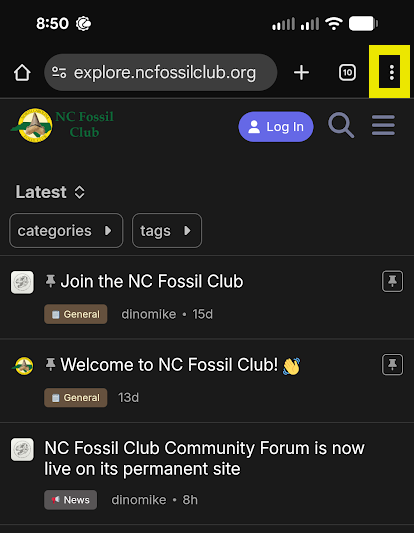
Tap the three-dot menu icon
 at the top right corner of the screen
 -
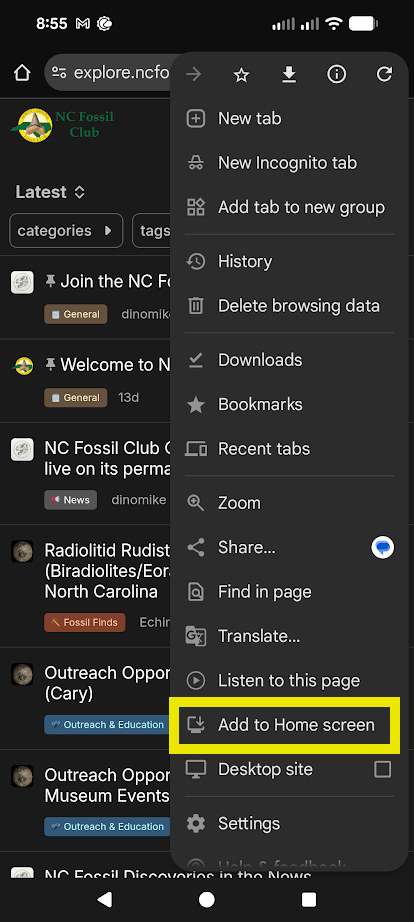
Tap Add to Home screen
-
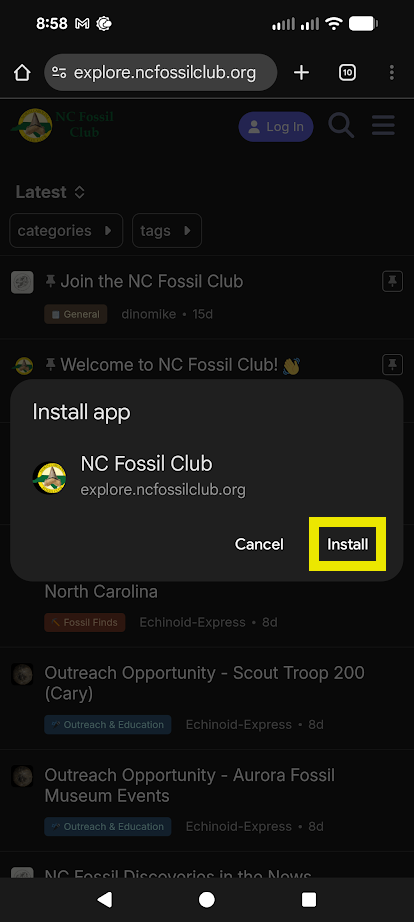
Confirm by tapping Install
Now you’ll find a new app in your App Drawer called “NC Fossil”.
To configure notifications:
- Tap the NCFC icon to launch your new app
- Log in
- At the top of the screen you’ll be asked if you want live notifications
- Tap Enable Notifications
- Tap Allow
To add this site to your iOS device:
- Open Safari
- Navigate to explore.ncfossilclub.org
- Tap the share icon (the square with the arrow pointing up)
- Scroll to then tap Add to Home Screen
- Tap Add
- You’ll see a new app icon
To configure notifications:
- Launch your new app
- Log in
- At the top of the screen you’ll be asked if you want live notifications
- Tap Enable Notifications
- Tap Allow
Now you’ll never miss another exciting post! 